Quick answer
To make a Pak Game deposit, log in, open Wallet or Deposit, choose JazzCash, EasyPaisa or bank transfer, enter an amount (minimum reported as Rs200), pay to the account shown on screen and submit the transaction ID if asked. Most deposits are credited within minutes; if not, send the TID and screenshot to in-app customer service.
Key facts at a glance
- Deposit methods
- JazzCash, EasyPaisa, bank transfer (reported)
- Minimum deposit
- Rs200 (reported, Oct 2026)
- Usual credit time
- A few minutes; longer at peak hours
- Deposit fee
- None charged by the app (wallet charges may apply)
- Proof needed if delayed
- Transaction ID (TID) + payment screenshot
- Where to complain
- In-app Customer Service / live chat
- Age requirement
- 18+ only
On this page (12 sections)
- What is a Pak Game deposit and how does it work?
- Which deposit methods does Pak Game accept?
- What is the minimum Pak Game deposit?
- How to deposit money in Pak Game (step by step)
- How to deposit with JazzCash
- How to deposit with EasyPaisa
- Can you deposit by bank transfer?
- Pak Game deposit not received? Causes and fixes
- Does Pak Game give a bonus on deposits?
- How to deposit safely: 8 practical tips
- What should you do after your first deposit?
- FAQs
A Pak Game deposit is how you add Pakistani rupees to your game wallet before you can play Win Go, Aviator or any other title. The app accepts local mobile wallets, so most players recharge with JazzCash or EasyPaisa in under five minutes. This guide covers every step of the deposit process, the minimum amount players report, how long a recharge should take, and what to do when money leaves your wallet but does not show up in your Pak Games balance.
Before you start, keep two things in mind. First, only deposit money you can afford to lose — this is real-money gaming and losses are normal. Second, always open the deposit page from inside the app or the link you trust (see our Pak Game official link guide), never from a number or link sent on WhatsApp.
What is a Pak Game deposit and how does it work?
A deposit moves money from your mobile wallet or bank account into your Pak Game balance. The app shows you a payment account (or a payment page), you send the exact amount, and the system credits your balance once the payment is confirmed.
Unlike a shopping app, Pak Games usually does not take card payments. Instead it relies on the payment rails Pakistanis already use every day. In most cases the deposit screen generates a payment order with an amount and a time limit (often 10–30 minutes). You pay within that window, then the order is matched with your transaction. If the match fails — for example because you sent Rs199 instead of Rs200 — the money sits in a pending state until support verifies it manually.
Your deposit sits in the main wallet. From there it can be used in every game, and it counts toward any first-deposit bonus event running at that time (check the Pak Game bonus page for how those events usually work).
Which deposit methods does Pak Game accept?
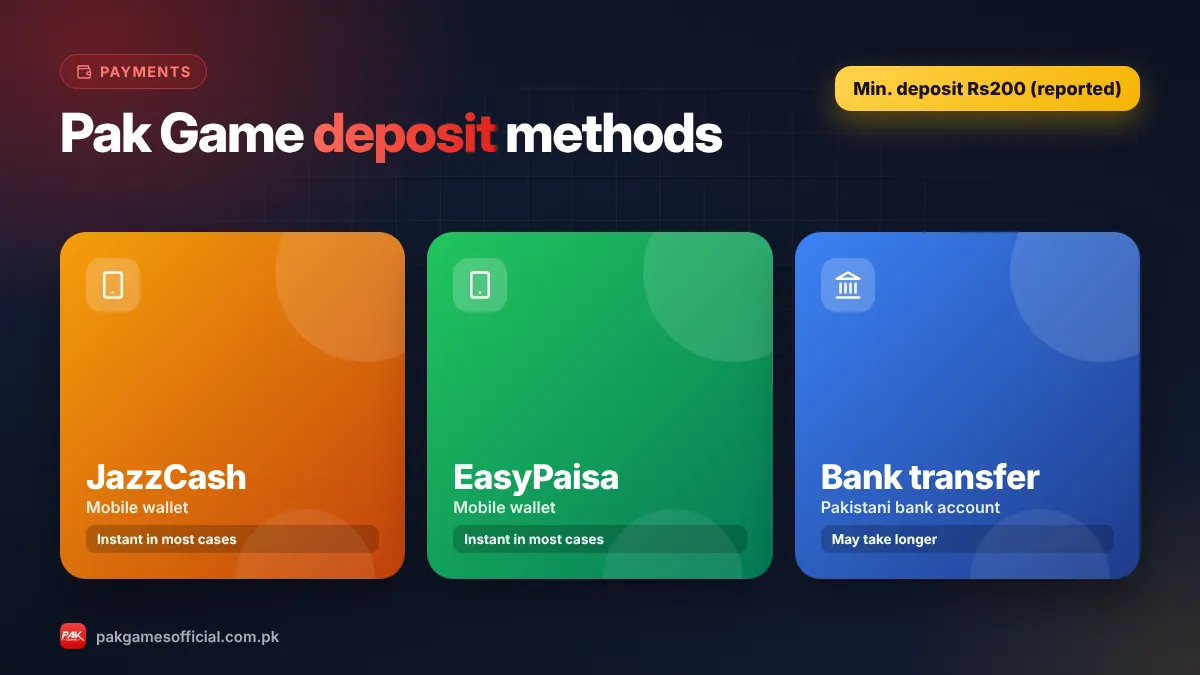
Players report three main options: JazzCash, EasyPaisa and bank transfer. Mobile wallets are the fastest and most popular because they work 24/7 from any phone.
| Method | Best for | Typical speed | What you need |
|---|---|---|---|
| JazzCash | Jazz/Warid users, quick small deposits | Instant to a few minutes | Active JazzCash account with balance, MPIN |
| EasyPaisa | Telenor users and anyone with an EasyPaisa app | Instant to a few minutes | Active EasyPaisa account with balance, PIN |
| Bank transfer | Larger amounts, players without a wallet | Minutes to several hours | Internet/mobile banking (Raast or IBFT) |
Available methods change from time to time. If one option is missing or shows “maintenance”, try another method or wait — do not pay to any account that is not shown inside the deposit screen. For help setting up your wallet, read how to add a JazzCash or EasyPaisa wallet in Pak Game.
Ready to start?
Create your Pak Game account in about 2 minutes
Android APK or mobile browser · JazzCash & EasyPaisa · 18+ only
875532042042 What is the minimum Pak Game deposit?
The minimum Pak Game deposit reported by players is Rs200 as of October 2026. Some promotional channels mention larger “recommended” amounts, but Rs200 is the lowest figure the deposit screen typically accepts.
There is no widely reported maximum for standard accounts, although your own wallet has daily and monthly limits set by JazzCash, EasyPaisa or your bank. The deposit page usually shows quick-pick buttons (for example Rs200, Rs500, Rs1,000, Rs3,000, Rs5,000). Choosing one of these reduces typing mistakes, which are the number-one reason deposits get stuck.
Note: Amounts, limits and available channels can change without notice. Always confirm the current minimum on the deposit screen inside the app before paying.
How to deposit money in Pak Game (step by step)
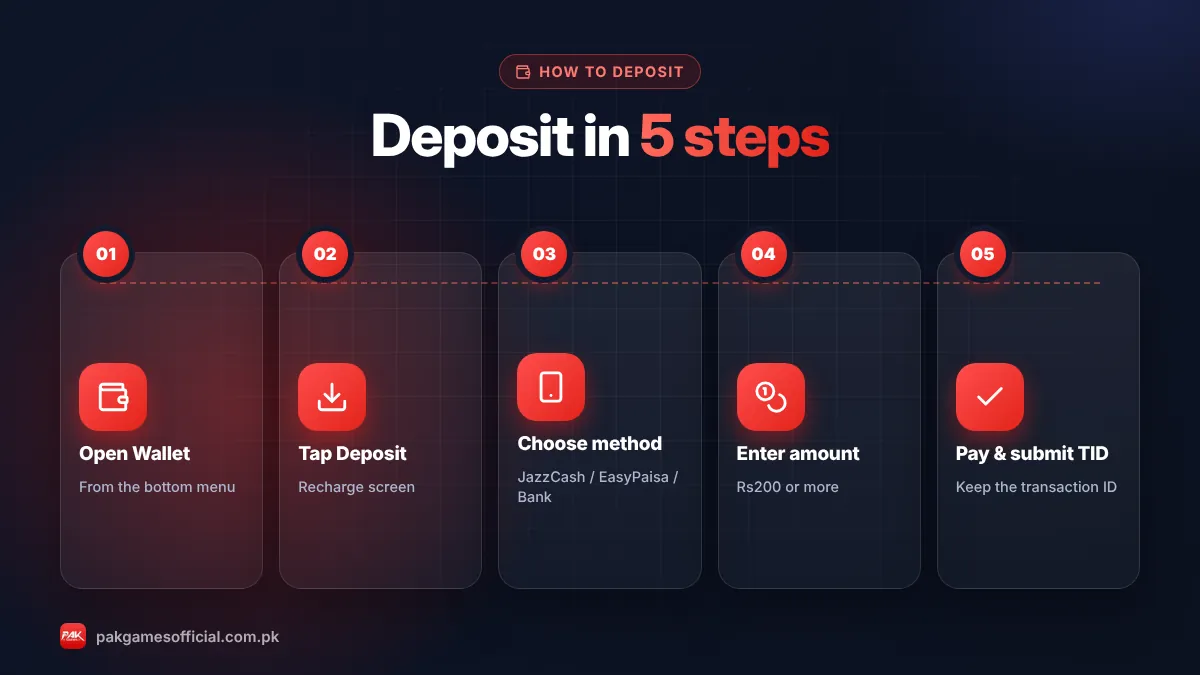
The whole process takes two to five minutes. Follow these steps exactly and keep your payment receipt until the money appears in your balance.
- Log in to your account Open the Pak Games app or web version and sign in with your +92 number and password. If you are new, complete the Pak Game register process first.
- Open the Wallet or Deposit section Tap Wallet, Deposit or Recharge (the label differs by version). You will see your current balance and the available payment channels.
- Choose a payment method Select JazzCash, EasyPaisa or bank transfer. If there are several channels for the same wallet, pick one that is not marked busy.
- Enter the deposit amount Type the amount or tap a quick-pick button. Make sure it is at least Rs200 and that your wallet has enough balance, including any wallet charges.
- Pay the exact amount shown Follow the on-screen instructions: either you are redirected to a payment page, or you are shown an account number to send money to. Send the exact amount, from your own wallet, within the time limit.
- Submit the transaction ID if asked Copy the TID (transaction ID) from your JazzCash or EasyPaisa SMS/receipt and paste it into the deposit order. Take a screenshot of the receipt.
- Check your balance Return to the app and refresh. Most deposits show up within minutes. Check the deposit history to see if the order is “Success”, “Pending” or “Failed”.
How to deposit with JazzCash
To deposit with JazzCash, choose JazzCash on the deposit screen, enter the amount, then either approve the payment request in your JazzCash app or send money to the number displayed and paste the TID back into the order.
- Keep your JazzCash app updated and make sure your MPIN works before starting.
- Pay from a JazzCash account registered in your own name — the same account you plan to use for withdrawals later.
- Your TID is in the confirmation SMS and in JazzCash → Transaction History.
- If you received a payment prompt but did not approve it in time, the order will expire; create a new one rather than paying the old account later.
How to deposit with EasyPaisa
EasyPaisa deposits work the same way: select EasyPaisa, enter the amount, complete the payment in your EasyPaisa app (or send to the account shown), and confirm with the transaction ID.
- Check your EasyPaisa daily limit if you are depositing a large amount; an account with incomplete biometric verification has lower limits.
- Copy the TID from the EasyPaisa receipt screen — not the reference number of a different payment.
- If the EasyPaisa app shows “transaction successful” but the game balance does not update after 30 minutes, follow the troubleshooting table below.
Can you deposit by bank transfer?
Yes, bank transfer is reported as a third option, usually via Raast or IBFT from your mobile banking app. It is slower than wallets and more prone to mismatches, so use it mainly for larger amounts.
When paying by bank, copy the account title, IBAN or Raast ID exactly as shown, add the order reference in the remarks field if the app asks you to, and save the bank’s transaction receipt. Bank transfers made outside banking hours may take longer to reflect.
Roman Urdu mein samjhein
Pak Game mein deposit karne ke liye app mein login karein, Wallet ya Deposit par jayen, JazzCash, EasyPaisa ya bank transfer select karein aur amount likhein (kam se kam Rs200). Screen par jo account dikhaya jaye usi par exact amount bhejein aur TID (transaction ID) copy kar ke order mein daal dein. Aam tor par paise kuch minute mein balance mein aa jate hain. Agar 30 minute tak na ayen to TID aur screenshot app ke Customer Service ko bhejein. Kabhi bhi WhatsApp par diye gaye kisi number par paise na bhejein.
Pak Game deposit not received? Causes and fixes
If money left your wallet but your Pak Game balance did not change, the payment almost always needs to be matched manually. Do not pay again — first find the cause using the table below.
| Problem | Likely cause | What to do |
|---|---|---|
| Status “Pending” for 10–30 minutes | Peak-time load or slow wallet confirmation | Wait 30 minutes, refresh deposit history, then contact support with TID |
| Paid but no order in history | Order expired or you paid outside the app flow | Send TID, amount, time and screenshot to in-app Customer Service |
| Wrong amount credited | Sent a different amount than the order | Submit receipt; support adjusts after verification |
| Order shows “Failed” | Payment declined, wrong PIN or limit reached | Check wallet balance/limits; if money was deducted, it is usually reversed by the wallet |
| Wallet says success, app shows nothing for hours | Wrong TID entered or account mismatch | Re-submit the correct TID and screenshot through support chat |
| Payment page won’t open | Old app version or weak internet | Update the APK, switch Wi-Fi/data, try another channel |
Reach support only through the app’s Customer Service section. Our Pak Game customer service guide explains how to contact the real team and how to spot fake “deposit agents”.
Warning: Scammers pretend to be Pak Game agents and ask you to “re-send the deposit” or “pay a verification fee” to release a stuck payment. Real support never asks for your PIN, OTP or an extra payment to fix a deposit.
Does Pak Game give a bonus on deposits?
Pak Games regularly runs first-deposit and recharge events, but amounts and rules change. When an event is active, it is usually shown in the Activity or Promotion section and credited automatically after a qualifying deposit.
Bonus money nearly always comes with a wagering (turnover) condition — you must bet a certain amount before you can withdraw. Read the event rules before depositing just to chase a bonus. Our Pak Game bonus guide explains welcome bonuses, VIP rewards and gift codes in detail.
How to deposit safely: 8 practical tips
Safe depositing comes down to using the official app, paying only the account shown on screen, and keeping records. These habits prevent most problems.
- Open the app from a trusted source; check the link before every login.
- Pay only to the account generated inside the deposit order — never to a number from social media.
- Use a wallet registered in your own name; the same name should be used for withdrawals.
- Send the exact amount and finish within the order’s time limit.
- Save every TID and screenshot until the balance is credited.
- Never share your JazzCash MPIN, EasyPaisa PIN or OTP with anyone.
- Set a monthly deposit budget and stick to it.
- Take breaks; never deposit to win back losses.
In short: Deposit through the app only, start small (the minimum is reported as Rs200), keep your TID, and contact in-app support — not WhatsApp numbers — if a payment does not appear within 30 minutes.
What should you do after your first deposit?
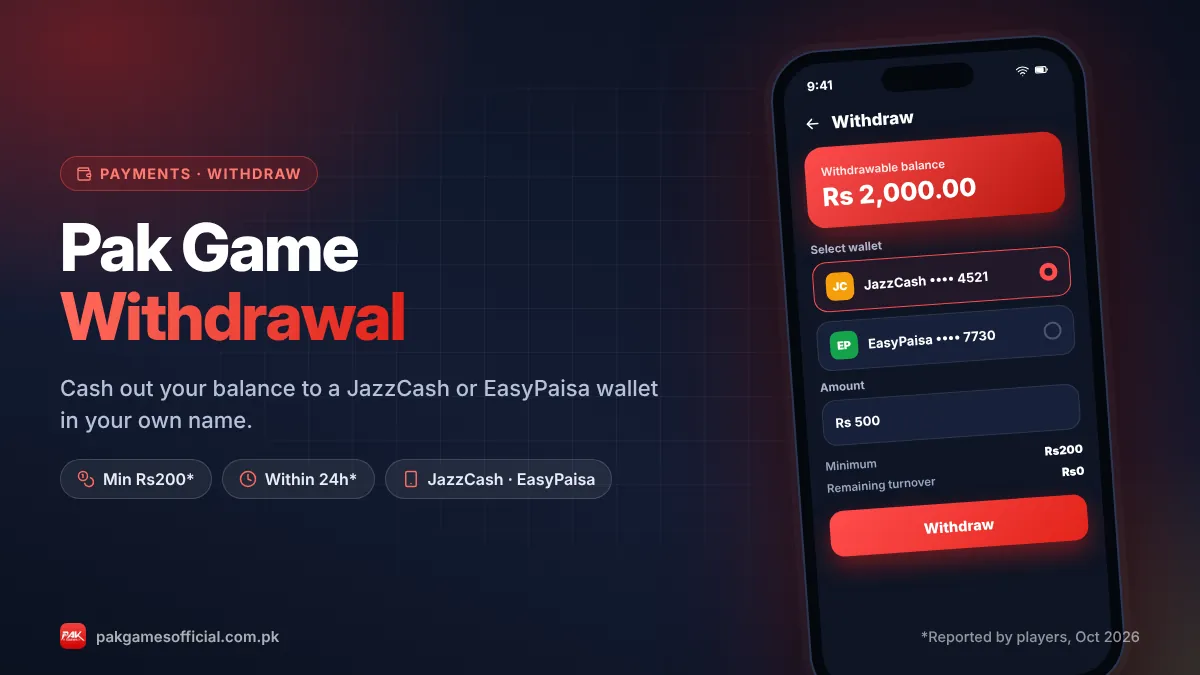
Once your balance shows up, set up your withdrawal details right away so cashing out later is smooth. Bind the same JazzCash or EasyPaisa account you deposited from, and check whether the withdraw page shows any turnover requirement.
Then learn the rules of the game you want to play before betting. Start with our guides to Pak Game Win Go and the Pak Game Aviator crash game, or browse the full Pak Game games list. When you are ready to cash out, follow the Pak Game withdrawal guide. And if you are new to the platform, our Pak Game homepage gives you the complete overview.
Responsible gaming: Pak Games is for adults 18+ only. Treat deposits as entertainment spending, not an investment. If gaming stops being fun, read our responsible gaming page.
Frequently asked questions
What is the minimum deposit in Pak Game?
The minimum Pak Game deposit reported by players is Rs200 as of October 2026. The deposit screen usually offers quick-pick amounts starting from that figure. Limits can change, so confirm the minimum shown in the app before you pay.
How long does a Pak Game deposit take?
JazzCash and EasyPaisa deposits are usually credited within a few minutes. Bank transfers can take longer, especially outside banking hours. If a deposit is still pending after 30 minutes, contact in-app customer service with your transaction ID and receipt screenshot.
Can I deposit in Pak Game with JazzCash?
Yes. JazzCash is one of the main deposit methods. Choose JazzCash on the deposit page, enter the amount, approve or send the payment, and paste the TID if the order asks for it. See our wallet setup guide for details.
Can I deposit with EasyPaisa?
Yes, EasyPaisa deposits work the same way as JazzCash. Select EasyPaisa, enter at least Rs200, complete the payment in your EasyPaisa app and confirm with the transaction ID. Make sure your account limits allow the amount you want to send.
My money was deducted but not added to Pak Game. What should I do?
Do not deposit again. Check the deposit history, wait up to 30 minutes, then send your TID, amount, payment time and a screenshot to the in-app Customer Service. Most stuck deposits are matched manually once the transaction is verified.
Is there a fee for depositing in Pak Game?
Pak Game itself is not reported to charge a deposit fee. However, JazzCash, EasyPaisa or your bank may apply their own transaction charges depending on your account type and the amount, so check your wallet’s fee schedule.
Do I get a bonus on my first deposit?
Often, but not always. First-deposit events appear in the Activity section when active and usually require wagering before withdrawal. Read the current rules in the app and our Pak Game bonus guide before depositing for a bonus.
Can someone else deposit into my Pak Game account?
It is safer to deposit only from a wallet in your own name. Payments from other people’s accounts are harder to verify and can cause problems when you withdraw, because the withdrawal wallet name usually has to match your account details.