Quick answer
To update Pak Game to the latest version, download the newest APK only from the official link, install it over the old app without uninstalling, then open it and log in with your +92 number and password. Your account and balance are stored on the server, so updating does not erase them.
Key facts at a glance
- Update method
- Install new APK over the old one
- Account data
- Saved on server, not on the phone
- Android needed
- Android 5.0 or newer (reported)
- Typical APK size
- About 50–55 MB (varies by version)
- Google Play updates
- Not available – APK only
- Cost
- Free – never pay for an update
On this page (8 sections)
Keeping the Pak Game latest version on your phone matters more than most players think. Because the Pak Games app is distributed as an APK and not through Google Play, it never updates itself automatically. If you stay on an old build, you may see login errors, games that won’t load, or a message asking you to “update to continue”. This guide shows you how to update safely, how to check which version you have, and how to avoid fake “update” files that steal accounts.
If you have never installed the app before, start with our full Pak Game download guide first, then come back here when the next update arrives.
Why should you update the Pak Game APK?
You should update because old versions eventually stop working with the game servers. New builds usually fix bugs, add games or events, and patch security problems.
Players typically notice they need an update when one of these things happens:
- A pop-up inside the app says a new version is available or required.
- Games such as Win Go or Aviator keep loading but never open.
- Login fails even though the password is correct (see our login problem fixes).
- Deposit or withdrawal pages show blank screens or errors.
- New events or bonuses announced on the official channel do not appear in your app.
An update does not change your balance, VIP level or transaction history. All of that is linked to your account on the server, not stored inside the APK file.
How to check which version you have
You can check your installed version from Android settings in under a minute. Compare it with the version listed on the official download page before you install anything.
- Open your phone’s Settings.
- Go to Apps (or Apps & notifications / Application manager, depending on the brand).
- Find and tap Pak Games.
- Scroll to the bottom — the version number is shown there (on some phones under “App details” or “Advanced”).
Some builds also show the version inside the app under Account or Settings. If the number on the official download page is higher than yours, it’s time to update.
Ready to start?
Create your Pak Game account in about 2 minutes
Android APK or mobile browser · JazzCash & EasyPaisa · 18+ only
875532042042 How to install the Pak Game latest version (step by step)
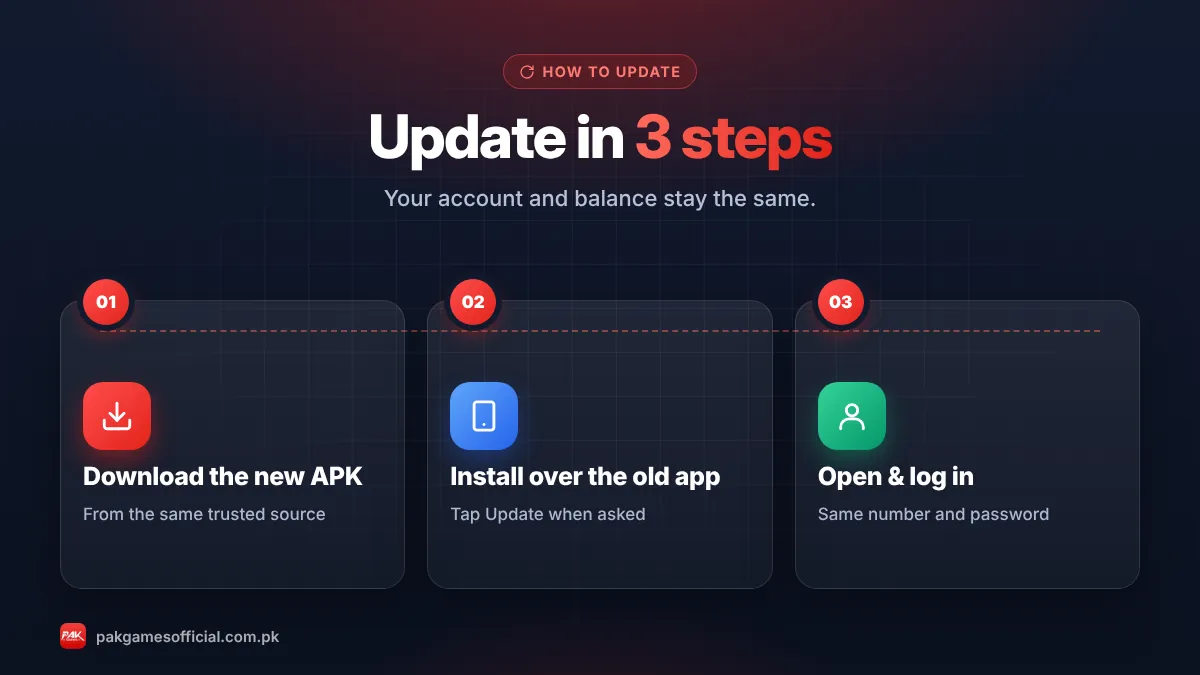
The safest way is to install the new APK directly over the old one. This keeps the app signed with the same key, so Android treats it as an update rather than a new app.
- Open the official link Go to the official download page from a trusted source. Our official link guide explains how to spot look-alike sites. Never use an APK sent on WhatsApp by a stranger.
- Download the newest APK Tap the download button and wait for the full file to finish (roughly 50–55 MB). A file that is only a few hundred KB, or one with a strange name, is a red flag.
- Allow installs from your browser If Android asks, allow “Install unknown apps” for the browser you used (Chrome, for example). You only need to do this once.
- Install over the old app Open the downloaded file and tap Update or Install. Do not uninstall the old version first unless an error forces you to.
- Open and log in Launch Pak Games and sign in with your +92 mobile number and password. Check that your balance and VIP level are correct.
- Switch off unknown-app access For better security, go back to Settings and turn off “Install unknown apps” for your browser again.
Tip: Before updating, make sure you remember your password. If you are not sure, reset it first from the Pak Game login page using “Forgot password”, so you are not locked out after the update.
Common update errors and how to fix them
Most update problems come from a broken download, low storage, or a signature mismatch. The table below covers the errors players report most often.
| Error message | Likely cause | What to do |
|---|---|---|
| “App not installed” | New APK is signed differently from your old one, or the download is corrupt | Re-download from the official link. If it still fails, uninstall the old app and install the new one fresh (your account stays safe on the server). |
| “There was a problem parsing the package” | Incomplete download or Android version too old | Delete the file, download again on stable Wi-Fi or mobile data, and confirm your phone runs Android 5.0 or newer. |
| “Blocked by Play Protect” | Google Play Protect warns about apps from outside the Play Store | Read the warning carefully. Only continue if the file came from the official source. See Google’s Play Protect help. |
| “Insufficient storage” | Not enough free space for the update | Free at least 300 MB: clear old downloads, cache, and unused apps. |
| App crashes after update | Old cache conflicts with the new build | Settings → Apps → Pak Games → Storage → Clear cache. If it still crashes, clear data and log in again. |
How to avoid fake “update” files
Fake updates are one of the most common ways Pak Game accounts get stolen. Scammers send a file that looks like a new version but actually records your login or OTP.
Warning: No genuine update asks you to pay money, enter your OTP into a website, or share your password on WhatsApp or Telegram. If an “update” asks for any of these, delete it.
Watch out for these warning signs:
- The file is called something like “PakGame_VIP_unlock.apk” or promises “hack”, “mod” or “guaranteed wins”. Our article on Pak Game mod APK and hacks explains why these never work.
- The link was shared in a random group, comment section, or private message.
- The download site is full of pop-ups and redirects.
- The app asks for extra permissions such as reading SMS, contacts or accessibility services.
- After installing, a second unknown app appears on your phone.
If you think you installed a fake update, uninstall it immediately, change your Pak Game password from a safe device, and contact in-app support through the steps on our customer service page.
When should you do a clean reinstall?
A clean reinstall (uninstall, then install fresh) is only needed when a normal update keeps failing. It sounds risky, but it doesn’t delete your account.
Do a clean reinstall if:
- You get “App not installed” even after downloading twice from the official source.
- The app crashes on launch even after clearing cache and data.
- You suspect your current version came from an unofficial site.
After reinstalling, log in with your usual number and password. Your wallet, bound JazzCash or EasyPaisa account, and history should all reappear. If anything is missing, take a screenshot and report it to support.
Roman Urdu mein samjhein
Pak Game ki nayi update ke liye sirf official link se latest APK download karein aur purani app ke upar hi install kar dein — uninstall karne ki zaroorat nahi. Aap ka account aur balance server par save hota hai, is liye update se kuch delete nahi hota. Kisi bhi WhatsApp ya Telegram group se aane wali “update” file install na karein aur apna OTP ya password kisi ko na batayein.
What about iPhone users?
iPhone users don’t install an APK, so there is nothing to update manually. They play through the mobile website in Safari or Chrome, which always loads the current version. Our guide on playing Pak Game on iPhone and PC shows how to add the site to your home screen so it feels like an app.
In short: Download the newest APK from the official link, install it over the old app, and log in. Your account stays safe on the server. Never trust “update” files from strangers, never pay for an update, and keep your password private. For everything else about the app, see our main Pak Game guide.
Frequently asked questions
Does updating Pak Game delete my balance?
No. Your balance, VIP level, bound wallet and transaction history are stored on the platform’s server and linked to your +92 number. Updating or even reinstalling the APK does not remove them. Just make sure you know your password before you update.
Why doesn’t Pak Game update from the Play Store?
Pak Games is distributed as an APK outside Google Play, so the Play Store cannot update it. You need to download each new version manually from the official link, as explained in our download guide.
How do I know if a new version is available?
Usually the app shows an update pop-up, or the official Telegram channel announces it. You can also compare the version number in Settings → Apps → Pak Games with the version shown on the official download page.
Should I uninstall the old version before updating?
Normally no. Install the new APK over the old one so Android treats it as an update. Only uninstall first if you keep getting “App not installed” errors after downloading the file twice from the official source.
Is it safe to download the latest version from any APK site?
It is risky. Third-party APK sites may host modified or fake versions that steal login details. Use only the official link and check the file size and name. Our official link guide shows how to spot fake domains.
What if the app still won’t open after updating?
Clear the app cache from Settings → Apps → Pak Games → Storage, restart the phone, and try again. If it still fails, do a clean reinstall. If the problem continues, contact in-app customer service with a screenshot of the error.
Do I have to pay for a Pak Game update?
No. Updates are free. Anyone asking for money, a “VIP unlock fee” or your OTP in exchange for an update is running a scam. Report and block them.